
Digital platforms are changing the way departments are handling employee records and services. Manav Sampada Portal is one of them which was launched by the Government of Uttar Pradesh. Many administrative tasks for government personnel have become comparatively easier through this – whether it be leave applications, upkeep of service records or updating personnel details. Know the Manav Sampada login process if you are a government employee of Uttar Pradesh. Using this portal, employees are able to view all service-related information, online leave applications, and employment details without appearing in the office. This is a comprehensive guide on Manav Sampada login, its benefits, steps to login, registration process, features and solutions for problems you may face while login.
What is Manav Sampada?
Manav Sampada is an web based Human Resource Management System (HRMS), launched by the Government of Uttar Pradesh to digitize employee services in the respective departments. It manages all records of digital services from government employees and enhances the transparency of the administrative process via portal.
The system’s main objective is to minimize paper work and make the employee related services available online. However, the portal is used by thousands of government employees on a daily basis across UP to manage their service information.
Employers can view their profile, apply for leave, check service history, and change personal information via Manav Sampada login.
Key Features of the Manav Sampada Login
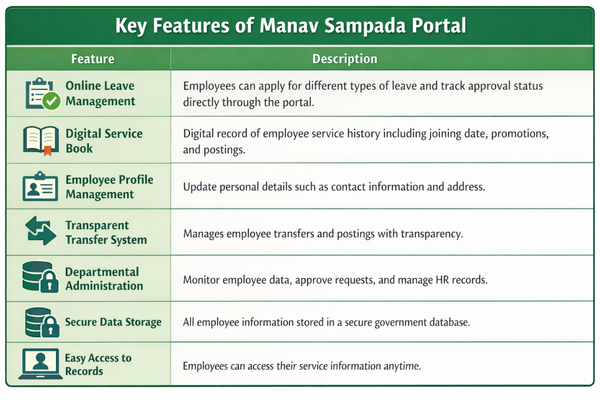
The portal offers several features that facilitate the management of professional records of government employees.
1. Online Leave Application
One of the most used features The portal enables employees to apply for different types of leave. After submitting a leave request through Manav Sampada login it reaches the immediate authority for approval. The progress of the application can also be viewed online by employees.
2. Digital Service Book
It keeps a digital service book for every single employee on the platform. Which includes all the important information such as:
- Date of joining
- Posting history
- Promotion records
- Department details
3. Employee Profile Management
Portal enables the employees to update their personal details like contact numbers, addresses, and other basics.
Having up-to-date profile assists in keeping the records updated in government databases.
4. Transparent Transfer System
The portal is also expected to bring in transparency in transfers and postings of employees. It becomes easier for the departments to monitor and verify as digital records are available.
5. Departmental Management
It is a system that can help government departments to manage staff records, approve leaves, track employee data and generate reports.
Step-by-Step Guide to Manav Sampada Login
The Manav Sampada login may be easy to do, but it can become slightly confusing for those using it for the first time. It is aimed at enabling government employees to have online access to their service history, leave applications and other professional data seamlessly. Keep reading the following steps carefully to complete the Manav Sampada logging process without any hurdles.
Step1: Go to Manav Sampada Official Portal
Visit the official Manav Sampada website. This can also be done by opening any web browser (Google Chrome, Microsoft Edge, or Mozilla Firefox) on any computer or mobile device.
Type the official Manav Sampada portal link in the URL bar and hit enter When the page loads, you will be redirected to the homepage of the portal. The page typically contains various options pertaining to employee services, department details, and login access, etc.
For your own protection, you should always make sure that you are logging into the correct site.
Step 2: Find Manav Sampada Login
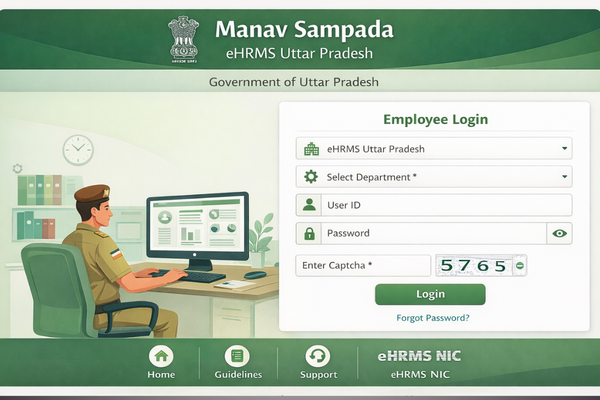
When the home page opens, you find the login section on the screen. Generally, Manav Sampada Login option will be clear on the homepage. This section is dedicated to government employees who wish to log in to their accounts. You will be prompted with a login panel to enter your credentials to verify your identity by the system.
Wait, before you enter your username or password, slowly read the fields part of the login form.
Step 3: Log in to Your Account
In the login section you will enter the data required to access your account. This information is typically entered by your department when they set you up in the system.
The system generally asks for the following information:
- User ID – This is your unique employee ID for signing into the portal.
- Password: The Manav Sampada account password
Department or Captcha (if needed): In some of the login pages, you are also required to select your department or have to enter captcha for security verification.
Enter the correct information, identify the correct record and do not enter invalid information here. Just entering a small error when entering the User ID or a typing mistake in password can stop you from logging in successfully.
Step 4: Verify the Information
It may help to visually scan the details you have entered before pressing the login button. Double-check that there are no additional spaces in front of your User ID and password.
If the portal has a captcha code, please write it in the box as shown in the screenshot. This step allows the system to verify that an actual person is attempting to log in.
Step 5: Press the Login button
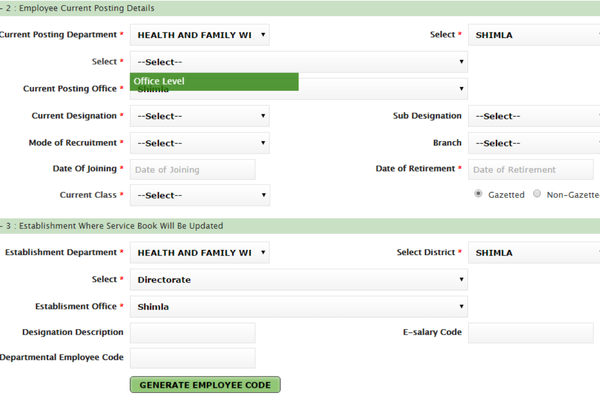
Then fill in the login info correctly, after that, click on the Login button. Automatic – Steps below will get executed and check if you are having the right credentials to run.
If the details are correct then you will be taken to your own Manav Sampada portal related dashboard.
Step 6: Log into Your Employee Dashboard
Once the Manav Sampada login is successfully done, you will be landed on your employee dashboard. This is the section utilized to handle your service-related action items.
From the dashboard, you can:
- Request different categories of leave
- Administrator View Leave Applications Status
- Consult your service record and employment record
- Update personal information
- Access department-related notifications
The dashboard provides navigation-free access to any service sought by the employees.
Step 7: Sign Off After Finishing Your Tasks
It is always a good idea to log out of your account when you are done with the portal. This secures your personal and work data, which is great when you’re on a public computer or other public device.
Logout is typically located at the top corner of the dashboard. Those govt employees who follow these step by step of Manav Sampada login process are easily able to log in and avail the complete services in the portal.
Manav Sampada Login: How To Apply Leave
Filing for leave in this system is super easy. So, here is a straightforward step by step process.
- Use the same details you use to login for Manav Sampada
- Navigate to the Leave Management Module.
- Choose which type of leave you wish to apply pen for
- Then fill in the leave dates and reason – directly from the point of view of Peon.
- Submit the application.
Your request will be communicated to the reporting authority for verification. Portal Leave Status: You can also check the leave status anytime through the portal.
Read More: AllHere Job Com: A Complete Guide|Is Qexilkizmor for Sensitive Skin? A Complete Guide|Qugafaikle5.7.2 Software|Fullimedia com:Understanding
Common Problems While Login into Manav Sampada
Occasionally users have issues opening the portal. Here are a few problems and solutions.
Forgot Password
In case you forget your password, you can recover it from the password recovery option on the login page.
Incorrect Login Credentials
Make sure you are entering the correct user id and password because If the user id and password Is not correct so you are not able to access.
Website Not Opening
This may be because of a server issue or internet speed. Please refresh the page or visit the portal sometime.
Account Access Issue
If you are locked out of your account or your account appears as inaccessible please reach out to your department administrator for help.
Conclusion
Uttar Pradesh – For government departments, the employee management has become a whole lot easier with the Manav Sampada login portal. The platform consolidates a myriad of useful features in one place – from applying for leave to accessing service records. Learn to Explore Use Git Portal: For government employees, learning how to explore the portal effectively can save a lot of time and effort and also make many administrative duties easier. The system encourages transparency, efficiency, and better data management too. With the reign of digital governance expanding, tools such as Manav Sampada will continue to simplify government functionalities and employee services further. The Manav Sampada login portal has made it easier for a government employee to access their service information quickly.
FAQs About Manav Sampada Login
Q1. What is Manav Sampada Login?
Manav Sampada login is an online portal that is used to access the service records of government employees in Uttar Pradesh and is used to manage various HR-related services. Employees can apply for leave, view their digital service book record, update personal details & track official records online, through this portal.
Q2. Manav Sampada Portal – Who can use it?
Login into Manav Sampada can be used by government employees of various departments of UP. The portal can be used by personnel such as teachers, administrative staff, health workers and numerous other government officials to maintain their employment particulars.
Q3. How To Login To Manav Sampada?
Manav Sampada login can be done through the official portal website by entering the User ID and password. The employee will be able to see his/her dashboard after logging in and all the services will be there including leave application, service record and so on.
Q4. What if I forget the login password of Manav Sampada?
If you forget your login password of Manav Sampada, reset your password by the password recovery option given on the login page. You will have to authenticate yourself via your mobile number linked with the KYC, or you can enter some other details associated with your KYC.
Q5. Can employees request for leave through Manav Sampada login?
Manav Sampada Login portal allows you an employee to apply for leave directly to the same. The leave application will be forwarded to the concerned authority for approval, and employees can track the approval of their application online.
Q6. How secure is the Manav Sampada portal?
Yes, Manav Sampada portal login is a government platform to safeguard employee data. The HRMS provides secure systems to store digital records and allows access to employee data by only authorized users.
Q7. Manav Sampada login What Services Are Available After Manav Sampada login?
Upon successfully logging into Manav Sampada, the employees are provided with multiple services like digital service book, leave application, profile upgrade, transfer information and other HR activities.

