
In this modern era, the Punjab government provides excellent land and revenue services. The government of Punjab created a society called the Punjab State E-Governance Society (PSEGS). Their primary objective is to provide a facility where land records and documents related to Punjab land are accessible. This society offers services through various infrastructures like Sukhmani centres. Sukhmani centres have been formed to manage the land records of Punjab in every way.
Sukhmani Centre is named after the Sikh prayer Sukhmani sahib; these centres provide various public services in Punjab. Sukhmani centres offer property tax payments, bill payments, certificates of death, certificates of birth, etc. The Punjab government aims to provide an improved and more accessible service to its public. Sukhmani centres are formed to manage the land records of Punjab.
Related Pages: Bhulekh BHUBANESWAR | Bhulekh Assam | BANGLARBHUMI
What is Jamabandi Punjab?
Jamabandi Punjab is a system of official online land records for the government of Punjab. It offers digital access to essential documents with respect to the land, like Ownership records, Khasra number, Khewat number, mutation status, and Plot Area. The PLRS provides the Jamabandi portal to facilitate transparency and to make land records available on a public platform. Citizens can now see and download their land records online without visiting government offices using this website.
Objectives of PLRS
The Punjab Land Record Society (PLRS) was established in order to update and digitise all land-related records. There are four major goals of PLRS: increase transparency in land tenure, decrease the number of disputes over ownership, lessen corruption and ensure online access to information is available immediately (LPIGS 2004). PLRS wishes to bring information such as mutation records, property tax and court case details on a single platform for public convenience.
Services Available on Jamabandi Portal
This portal provides various land and property-related services to the citizens of Punjab. These services comprise Jamabandi Nakal, online land record check by name of the owner, Khasra number, Khewat number and Khatauni number. Users can also monitor mutation status, see integrated land records, view live court cases on land and details of property tax. The portal also allows online applications for the correction of records and the availability of land information through Sukhmani Centres.
How to find the land records of Punjab online?
If you want to find Punjab’s land records online, these are some of the steps you have to follow.
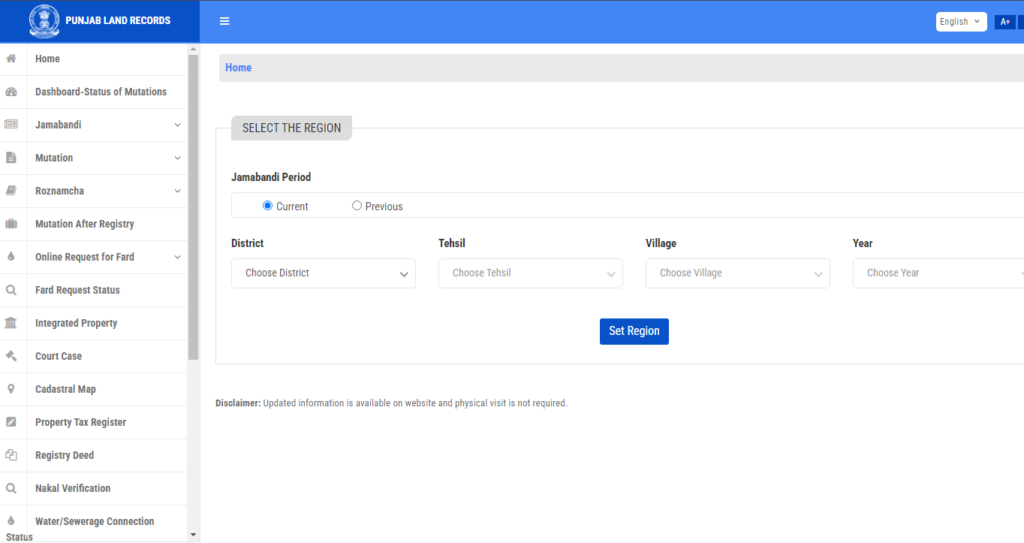
- Step 1 – First you have to visit the Jamabandi official website.
- Step 2 – after visiting, select a place like a district, village, or tehsil to see Punjab land records.
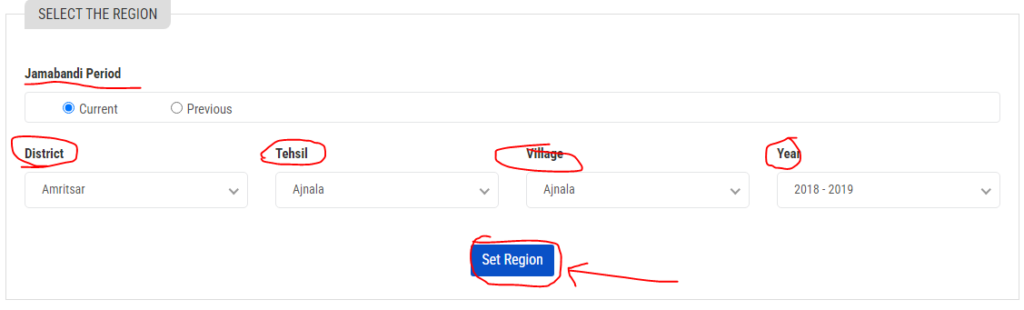
- Step 3 – After this, you need to select the type of nakal to view the Punjab land records.
Read Also: Bhu Map UP Online Check Kare | Bihar Dhakhil Kharij Kaise Dekhe | Haryana Bhulekh Benefits Of Land Records
Punjab land record by Khewat number, Khasra number, owner name, Khatauni number
Below are some steps given to see the land record by Khewat number, Khasra number, owner name, Khatauni number:
- Visit the official website of Jamabandi Punjab.
- There, you will see one option named jamabandi. Select it.
- If you want to search by owner name, select it on the second page.
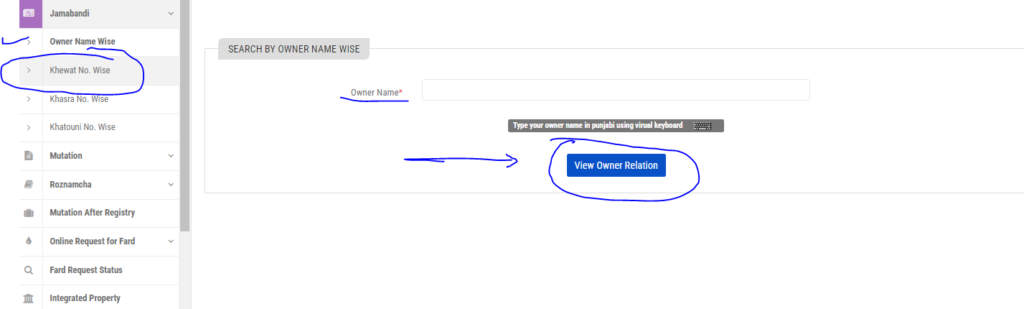
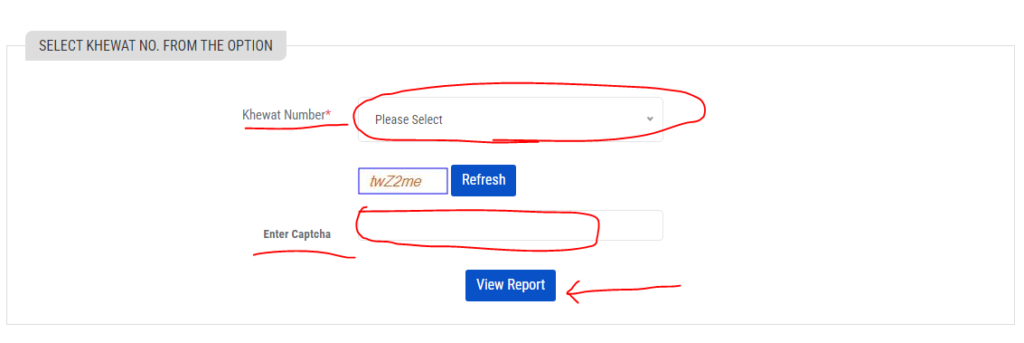
- Select khewat number-wise if you want to search by khewat number.
- After selecting, click on the view report option.
Khatauni number
- If you want to search by Khatauni number, then visit the Punjab land record.
- Choose the village, tehsil, and district to see land records.
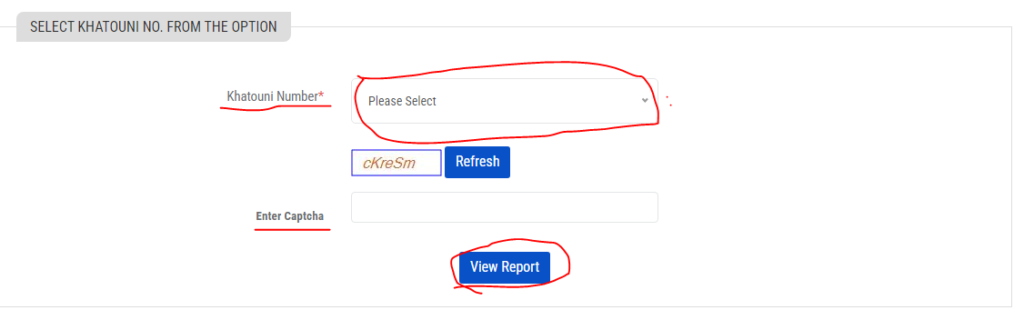
Khasra number.
- Visit Jamabandi in website to search by khasra number.
- Select the district, village, tehsil, and the year to see land records.
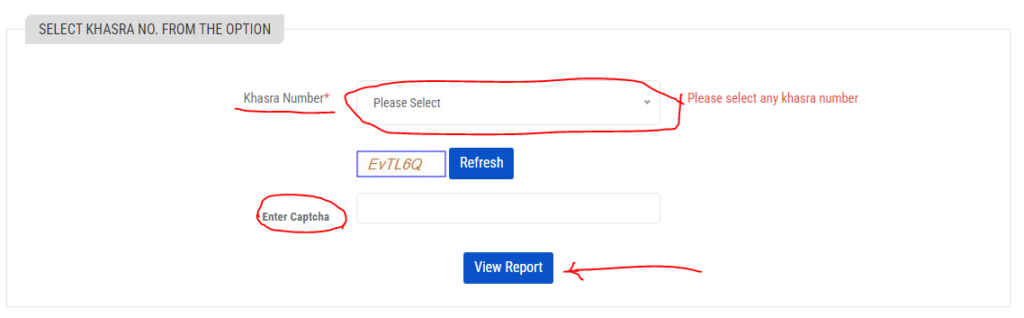
- In Jamabandi, you will see an option listed there, khasra number-wise; click on this to see land records.
Read Also: Banglarbhumi Khatian & Plot Information Kaise Dekhe | Cg Bhuiya Naksha Khasra Online Dekhe | Delhi Bhulekh Jamabandi Nakal Kaise Nikale
View the land records by mutation number
These are some of the steps listed below to view the land record by mutation number.
- Step 1 – Visit the jamabandi mutation.
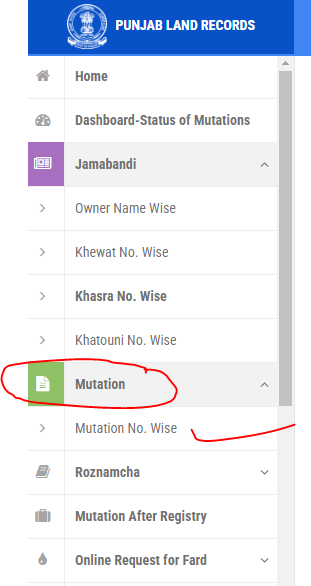
- Step 2 – Select the village, district, and year to view land records.
- Step 3 – Select the naked type, which will be the mutation.
- Step 4 – Then select the mutation number-wise.
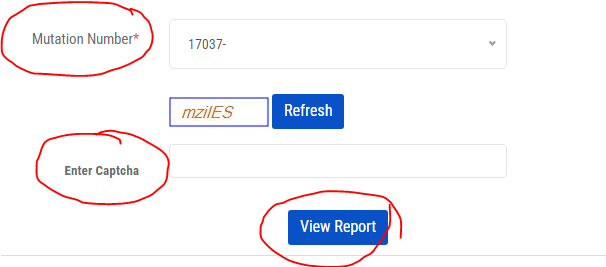
- Step 5 – You will find some options for mutation numbers listed there; select the mutation number.
Related Pages: Bhulekh Rajasthan | Bhulekh Haryana | Bhulekh Gujarat
View land record by rapat number
To see the land record by rapat number, visit the jamabandi and enter the district, tehsil, village, and year. Follow these steps and view land records by rapat number.
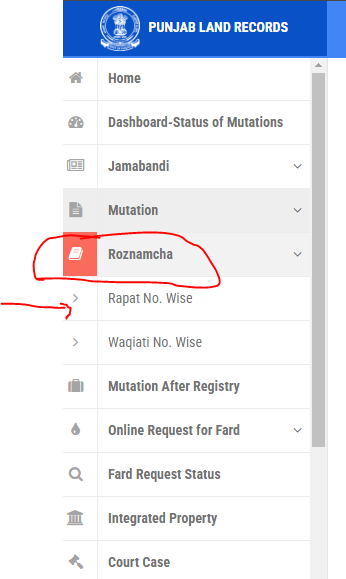
- Step 1 – Select the type of nakal to view the land records.
- Step 2 – You will find the second page where you have to select Roznmacha; after clicking on this, you will be redirected to the official. website of the Punjab government.
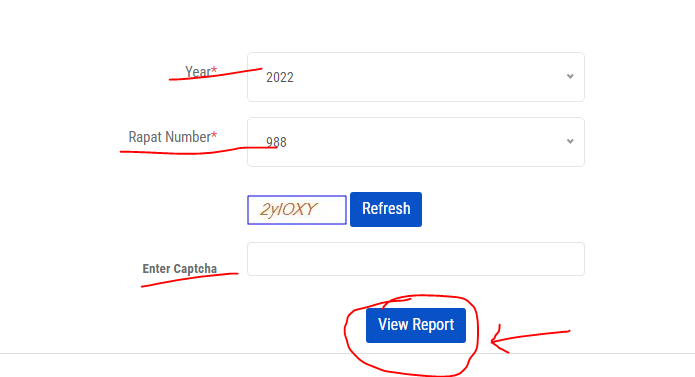
- Step 3 – To view the rapat number, select it and then select the year, rapat number, and click on view report to see land records.
Read Also: Dharani Land Search Check Online Records | Bhulekh Pune 7/12 Kya Hai | Bhulekh Agra Khatoni Kaise Dekhe
See land record by vaseeka number, transaction number, and Mutation request number
View the land record by using the Vaseeka number, transaction number, and mutation request number by following these view steps.
- Step 1 – First, visit the Punjab land record and select the district, village, tehsil, and year to see the land record.
- Step 2 – To view the land record, select the type of nakal.
- Step 3 – There you have to select Mutation After Registry.
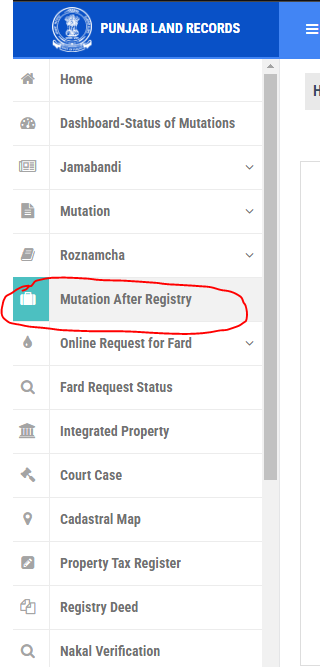
- Step 4 – You find the list of Vaseeka numbers. Select from this, and then select the registration date.
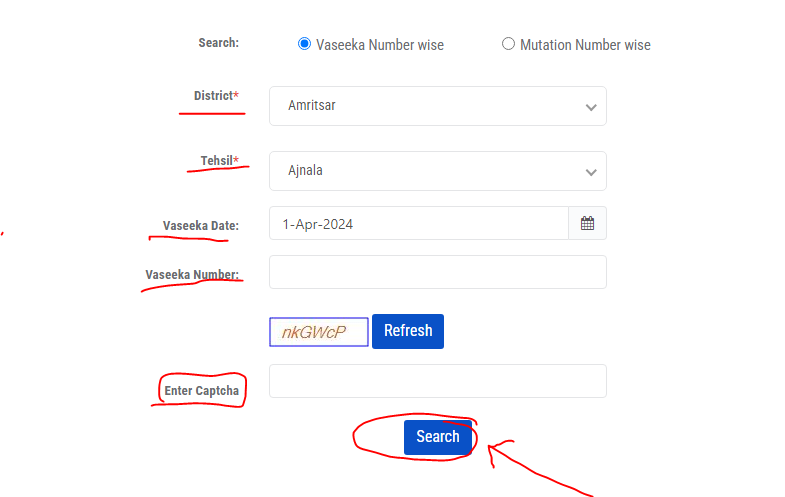
- Step 5 – If you want to check by transaction number, visit the Jamabandi page, select the transaction number, and click on it to submit.
- Step 6 – Visit the Jamabandi to view land records by mutation request. Select the mutation request number and click on it.
How to Download Jamabandi Nakal Online
Downloading Jamabandi Nakal online is an easy and convenient process in Punjab. Residents can check land records by visiting the official Jamabandi Punjab portal and choosing their district, tehsil, village and year. Select the mandatory particulars like Khasra number, Khewat number, or the name of the owner and access the Jamabandi Nakal in digital form. This online system would save time, paperwork and a visit to the government office.
Benefits of Online Land Records in Punjab
The introduction of land records online has brought in a certain degree of transparency and user-friendliness. Land information is now readily available to citizens at any time, wherever they are. Online land records play a critical role in minimising land disputes, forgery of property documents and enabling the easy verification of properties during transactions. There is also the promise of less reliance on intermediaries and more trust in government services through digital access.
Correction in Punjab Land Records Online
In case information about land ownership is wrong, area measurement or personal details are stated wrongly, the Punjab government has given an online provision to residents that they could apply for corrections through the Jamabandi portal. Use the following steps to easily apply for correction:
Step 1: Open the Official Jamabandi Portal
Visit the official website of Jamabandi Punjab that is jamabandi. punjab. gov.in.
Step 2: Choose the Correction Type
Right on the home page you will find land record correction or request for correction.
Step 3: Enter Land Details
Choose your district, tehsil, village and year, provide the Khasra number or Khewat number or fill in the name of the owner to pinpoint the land record that needs rectification.
Step 4: Choose the Correction Type
Choose the kind of correction that you’d like to keep and tap, for example:
- Owner name correction
- Area or land measurement correction
- Address or personal detail correction
Step 5: Upload Supporting Documents
- Scan and upload all the necessary documents in support of your application; these may include:
- Identity proof
- Sale deed or registry documents
- Previous land records
These papers help the authorities in authenticating and accepting your application.
Step 6: Submit the Application
Once you have filled in the necessary details, verify the information and submit your correction request over the internet.
Step 7: Track Correction Status
After submitting, you will get a reference number or application id. You will have to use this number on the Jamabandi portal as you would need to update or track the correction request status.
Check integrated land records
Check the integrated land records and follow some of the steps given.
- Step 1 – Visit the website jamabandi portal
- Step 2 – You will see one option named integrated property; click on it.
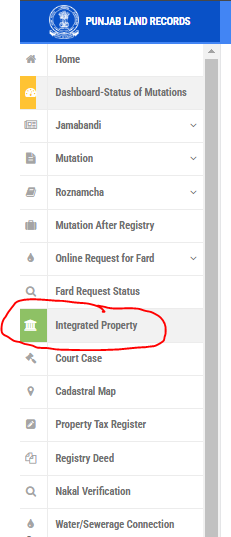
- Step 3 – Enter the details asked there, such as the location, the number, property number.
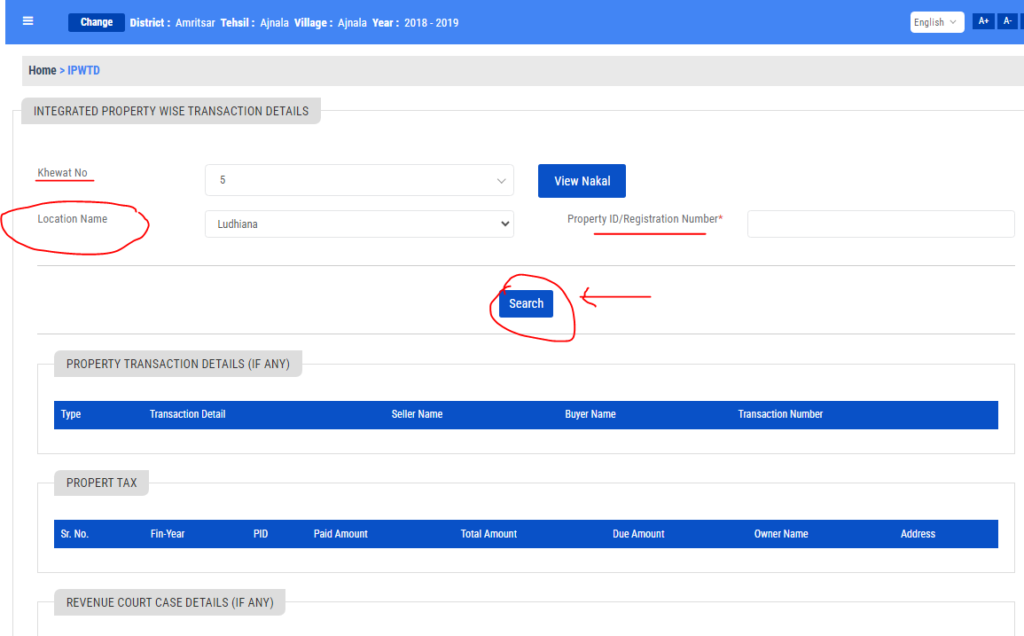
- Step 4 – After entering this, you will see a new page with information regarding property tax, property transactions, and court cases.
Check about court cases
The Jamabandi Punjab site also provides option for tracking court cases that are linked to land records. On entering information like district, tehsil, village and Khasra number, citizens can get to know the case status, filing date, particulars of parties and history of the case. This, the feature operates to allow users to verify legality disputes in order to purchase/sell land.
To view details about the court cases, follow the steps which are given below
- Step 1 – Visit this website: Jamabandi.punjab.gov.in
- Step 2 – Click on the court cases to see details about it.
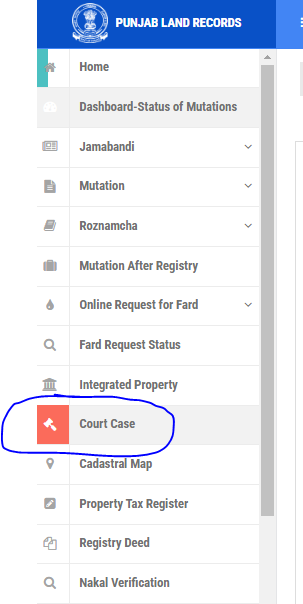
- Step 3 – Enter the details such as district, village, tehsil, and khasra number.
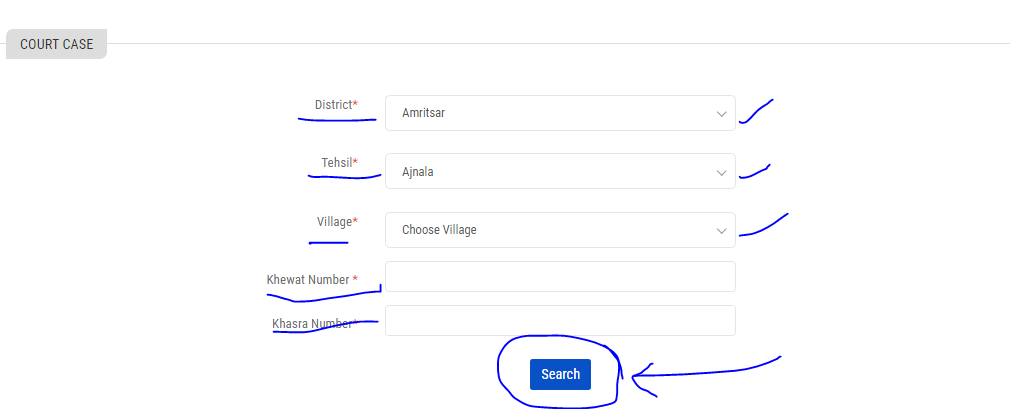
- Step 4 – After this, you will see the case number, main case detail, advocate details, date of filing the case, the status of the case, and party details.
Check the collector rates of PLRS
Collector rates are the minimum price of land set by the Punjab government for its registration. Latest collector rates can be browsed by users from the PLRS website after selecting the specific city or are. The collector rates are also important for citizens to estimate registration charges and prevent overpricing in property deals.
Follow these steps to check the collector rates on the PLRS website
- Step 1 – Visit this website plrs.org.in
- Step 2 – Then click on collector rates.
- Step 3 – The city names listed there, select the one for which you want to know the rates.
- Step 4 – After this, the rates will be given there.
Steps to get your property tax registered
Follow the steps to register your property tax
- Visit the official website of PLRS.
- After clicking on FARD.
- On the second page, click on the property tax register.
- There, you have to select the location where you live.
- Then, enter your property ID or registration number.
Below, the PLRS contact information is given
- 0172-2742242 and 0172-2748469 are the official numbers of PLRS; you can call on them and can contact them
- The email you can use for any query you have to send them: revenuecommissionpb@gmail.com
Post address of PLRS
Member secretary, room no 3,
Floor-4, Punjab Civil Secretariat,
Sector-1, chandigarh-160001.
FAQs on Bhulekh Punjab & Jamabandi
Q1. What is Bhulekh Punjab?
Bhulekh Punjab is a portal for land records of Punjab.
Q2. What is Jamabandi Nakal?
Jamabandi Nakal is a soft copy of land ownership , which is called jamabandi.
Q3. Is it possible to search land records with the owner’s name?
Yes, you can search the land records with the owner’s name.
Q4. How do I rectify mistakes in Punjab land records?
Mistakes can be rectified through an online correction request on the Jamabandi portal.
Conclusion
Bhulekh Punjab and the Jamabandi portal have transformed the way land records are managed and accessed in the state. By offering digital services such as Jamabandi Nakal download, mutation tracking, court case details, and property tax registration, the Punjab government has ensured transparency, efficiency, and ease of access for citizens. Using these online services not only saves time but also promotes a secure and reliable land record system.
StateWise Bhulekh Records
